# DevNet Lab 17 -- Automated testing with pyATS and Genie
[toc]
---
### Scenario
In this lab, you will explore the basics of [**pyATS**](https://developer.cisco.com/pyats/) (pronounced "py" followed by each letter individually, "A" "T" "S") and Genie. The pyATS tool is an end-to-end testing ecosystem that specializes in data-driven and reusable testing, and is designed for agile, rapid development iterations.
Genie extends and builds upon pyATS for use in a networked environment. Examples of features provided by Genie include:
- Device connectivity, parsers, and APIs
- Cisco platform-agnostic Python object models for features like OSPF and BGP
- Pool of reusable test cases
- YAML-based test-runner engine
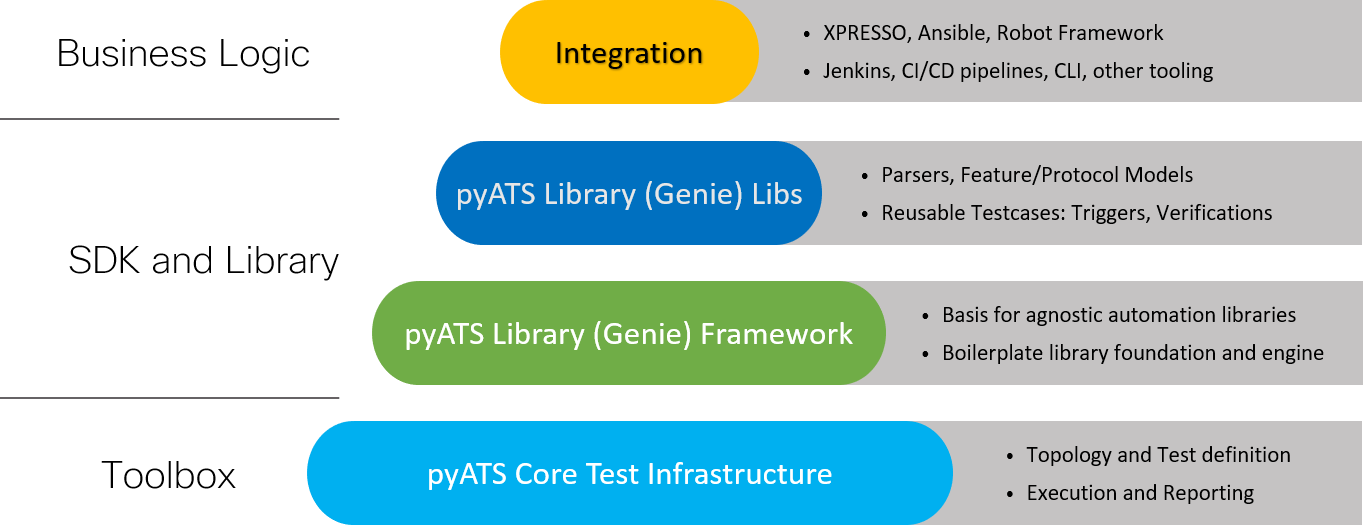
The true benefit of pyATS is the ability to quickly and easily test the **configuration state** and **operational state** of a device for compliance with the **desired state** of the network. While there are benefits to both types of testing, this lab is designed to familiarize you with operational state testing to provide a more complete view of your network's current status.

To illustrate **operational state** testing with pyATS, you need to run two routers that are OSPF protocol neighbors exchanging networks. This will allow you to test for the presence of an IPv4 network prefix on the spoke router that is advertised by the hub router.
### Objectives
After completing these lab activities, you will be able to:
- **Set up a lab environment**: Configure a lab environment with two virtual routers to test OSPFv3 configurations using pyATS and Genie.
- **Implement OSPFv3 Configurations**: Apply initial OSPFv3 configurations on both hub and spoke routers to establish network connectivity, and manually verify that OSPFv3 is working properly by examining routing tables and neighbor lists.
- **Develop custom Python tests**: Create Python scripts using pyATS to automate testing of network configurations and operational status, focusing on developing reusable test cases.
- **Execute automated tests**: Use pyATS to run automated tests to ensure that network configurations match expected states and that OSPFv3 is operating properly.
## Part 1: Prepare the lab environment
In this part, you will set up the lab environment. From the DevNet VM, you need to manage two routers that exchange IPv4 and IPv6 networks.
Therefore, you will start by declaring and configuring the hypervisor resources: six switch ports and two virtual routers. Then you set the initial configuration for each OSPFv3 routing process.
Here is a connection scheme table for both routers:
| Router interface | tap interface mode | VLAN(s) |
|:------ |:------- |:---- |
| GigabitEthernet1 | access mode | out-of-band |
| GigabitEthernet2 | access mode | isolated lab VLAN |
| GigabitEthernet3 | access mode | unused |
### Step 1: Declare and configure hypervisor switch ports
Use the [**switch-conf.py**](https://gitlab.inetdoc.net/labs/startup-scripts/-/blob/main/switch-conf.py?ref_type=heads) script with a YAML declaration file to configure the three switch ports needed by each virtual router.
Here is a template YAML declaration file named `switch.yaml` that configures 3 tap interfaces per router as described in the topology diagram:
```yaml=
ovs:
switches:
- name: dsw-host
ports:
- name: tapU # <-- SPOKE ROUTER G1 MGMT
type: OVSPort
vlan_mode: access
tag: _OOB_VLAN_ID_ # <-- YOUR OUT-OF-BAND VLAN ID
- name: tapV # <-- SPOKE ROUTER G2
type: OVSPort
vlan_mode: access
tag: _VVV_ # <-- YOUR PRIVATE VLAN ID FOR OSPF
- name: tapW # <-- SPOKE ROUTER G3
type: OVSPort
vlan_mode: access
tag: 999 # <-- UNUSED VLAN ID FOR THIS LAB
- name: tapX # <-- HUB ROUTER G1 MGMT
type: OVSPort
vlan_mode: access
tag: _OOB_VLAN_ID_ # <-- YOUR OUT-OF-BAND VLAN ID
- name: tapY # <-- HUB ROUTER G2
type: OVSPort
vlan_mode: access
tag: _VVV_ # <-- YOUR PRIVATE VLAN ID FOR OSPF
- name: tapZ # <-- HUB ROUTER G3
type: OVSPort
vlan_mode: access
tag: 999 # <-- UNUSED VLAN ID FOR THIS LAB
```
:::warning
As with all the labs in this series, be sure to replace all VLAN ID placeholders with your own identifiers.
:::
Here is a sample trace of the `switch-conf.py` script execution with some tap interface configuration changes:
```bash
switch-conf.py switch.yaml
```
```bash=
----------------------------------------
Switch dsw-host exists
>> Port tapU vlan_mode is already set to access
>> Port tapU tag is already set to _OOB_VLAN_ID_
>> Port tapV vlan_mode changed to access
>> Port tapV tag changed to _VVV_
>> Port tapW vlan_mode is already set to access
>> Port tapW tag is already set to 999
>> Port tapX vlan_mode is already set to access
>> Port tapX tag is already set to _OOB_VLAN_ID_
>> Port tapY vlan_mode changed to access
>> Port tapY tag changed to _VVV_
>> Port tapZ vlan_mode is already set to access
>> Port tapZ tag is already set to 999
----------------------------------------
```
### Step 2: Declare and start the two hub-and-spoke routers
As with switch ports, you start by creating a YAML declaration file for your virtual router. Here is an example declaration file named `lab17-routers.yaml`.
```yaml=
---
kvm:
vms:
- vm_name: lab17-spoke
os: iosxe
master_image: c8000v-universalk9.17.18.02.qcow2
force_copy: false
tapnumlist: [U, V, W] # <-- YOUR TAP INTERFACE NUMBERS
- vm_name: lab17-hub
os: iosxe
master_image: c8000v-universalk9.17.18.02.qcow2
force_copy: false
tapnumlist: [X, Y, Z] # <-- YOUR TAP INTERFACE NUMBERS
```
:::warning
Again, be sure to replace the placeholders in any `tapnumlist` list of tap interface numbers.
:::
Here is an example of running the `lab-startup.py` script:
```bash
lab-startup.py lab17-routers.yaml
```
:::info
Note that the routers may take some time to boot because the Cisco IOS XE system is multi-layered.
:::
### Step 3: Check the two virtual routers for SSH communication
In this step, you need to verify that the two routers are up and accessible via SSH before proceeding with the minimal configuration.
Using the `my-vms.py` script, you can gather the link-local IPv6 address of the two routers and test them with the `ssh` command.
```bash
my-vms.py ls --running --name lab17-spoke
```
```bash=
+-------------------+---------+----------+---------------------------+-------------------------------------+
| NAME | STATE | TAP | IPv4 | IPv6 |
+===================+=========+==========+===========================+=====================================+
| lab17-spoke.qcow2 | RUNNING | tapUUU | 198.18.VVV.AAA (vlan OOB) | fe80::faad:caff:fefe:UUU (vlan OOB) |
| | | access | | |
| | | vlan OOB | | |
+-------------------+---------+----------+---------------------------+-------------------------------------+
```
```bash
my-vms.py ls --running --name lab17-hub
```
```bash=
+-----------------+---------+----------+---------------------------+-------------------------------------+
| NAME | STATE | TAP | IPv4 | IPv6 |
+=================+=========+==========+===========================+=====================================+
| lab17-hub.qcow2 | RUNNING | tapXXX | 198.18.VVV.BBB (vlan OOB) | fe80::faad:caff:fefe:XXX (vlan OOB) |
| | | access | | |
| | | vlan OOB | | |
+-----------------+---------+----------+---------------------------+-------------------------------------+
```
Once the IPv6 link-local addresses of both routers are known, you can add two entries in your DevNet VM SSH client configuration file.
```bash
cat <<EOF >>$HOME/.ssh/config
Host spoke
HostName fe80::faad:caff:fefe:UUU%%enp0s1
User etu
Port 2222
Host hub
HostName fe80::faad:caff:fefe:XXX%%enp0s1
User etu
Port 2222
EOF
```
Then you initiate SSH connections from your DevNet VM shell.
```bash
ssh -q spoke exit
```
```bash=
(etu@fe80::faad:caff:fefe:UUU%enp0s1) Password:
Connection to fe80::faad:caff:fefe:UUU%enp0s1 closed by remote host.
```
```bash
echo $?
```
```bash=
0
```
```bash
ssh -q hub exit
```
```bash=
(etu@fe80::faad:caff:fefe:XXX%enp0s1) Password:
Connection to fe80::faad:caff:fefe:XXX%enp0s1 closed by remote host.
```
```bash
echo $?
```
```bash=
0
```
### Step 4: Set initial router configurations
Now that you have access to your hub-and-spoke routers, you can set up the initial configurations to test against.
First, open a new SSH connection and go to the router configuration terminal:
```console
rtrXXX#configure terminal
Enter configuration commands, one per line. End with CNTL/Z.
rtrXXX(config)#
```
Then copy and paste the spoke and the hub lab configuration onto each router.
- Spoke router configuration
```console
hostname spoke
!
ipv6 unicast-routing
!
username genieuser privilege 15 secret -genie-
!
router ospfv3 100
router-id 0.0.0.2
address-family ipv4 unicast
area 0
exit-address-family
address-family ipv6 unicast
area 0
exit-address-family
!
interface GigabitEthernet2
no shutdown
ip address 10.0.1.2 255.255.255.0
ipv6 enable
ipv6 address 2001:db8:1::2/64
ospfv3 100 ipv4 area 0
ospfv3 100 ipv6 area 0
!
interface Loopback0
ip address 10.0.2.2 255.255.255.255
ipv6 enable
ipv6 address 2001:db8:2::2/128
ospfv3 100 ipv4 area 0
ospfv3 100 ipv6 area 0
!
end
```
- Hub router configuration
```console
hostname hub
!
ipv6 unicast-routing
!
username genieuser privilege 15 secret -genie-
!
router ospfv3 100
router-id 0.0.0.1
address-family ipv4 unicast
area 0
exit-address-family
address-family ipv6 unicast
area 0
exit-address-family
!
interface GigabitEthernet2
no shutdown
ip address 10.0.1.1 255.255.255.0
ipv6 enable
ipv6 address 2001:db8:1::1/64
ospfv3 100 ipv4 area 0
ospfv3 100 ipv6 area 0
!
interface Loopback0
ip address 172.16.0.1 255.255.255.255
ipv6 enable
ipv6 address 2001:db8:ac::1/128
ospfv3 100 ipv4 area 0
ospfv3 100 ipv6 area 0
!
! Lo1 is the missing entry in the OSPFv3 configuration
!
interface Loopback1
ip address 172.16.1.1 255.255.255.255
ipv6 enable
ipv6 address 2001:db8:ac:1::1/128
!
end
```
Here are the common configuration items between the two configuration files:
- identical authentication credentials with the privileged user **genieuser**
- IPv6 routing
- OSPFv3 (process ID 100) with:
- Dual-stack support for both IPv4 and IPv6 address families
- All interfaces configured in area 0
- Loopback0 interface with IPv4/IPv6 addressing
:::warning
Note that the Loopback1 interface on the hub router is not enabled for OSPFv3. This is intentional because you want a test to fail.
:::
### Step 5: View the routing tables on each router
As a final step in this part, you will manually verify that OSPFv3 is working between the hub and spoke routers by looking at the presence of the IPv4 and IPv6 networks in the routing tables.
#### Spoke router tables
```console
sh ip route
```
```bash=
Codes: L - local, C - connected, S - static, R - RIP, M - mobile, B - BGP
D - EIGRP, EX - EIGRP external, O - OSPF, IA - OSPF inter area
N1 - OSPF NSSA external type 1, N2 - OSPF NSSA external type 2
E1 - OSPF external type 1, E2 - OSPF external type 2, m - OMP
n - NAT, Ni - NAT inside, No - NAT outside, Nd - NAT DIA
i - IS-IS, su - IS-IS summary, L1 - IS-IS level-1, L2 - IS-IS level-2
ia - IS-IS inter area, * - candidate default, U - per-user static route
H - NHRP, G - NHRP registered, g - NHRP registration summary
o - ODR, P - periodic downloaded static route, l - LISP
a - application route
+ - replicated route, % - next hop override, p - overrides from PfR
& - replicated local route overrides by connected
Gateway of last resort is not set
10.0.0.0/8 is variably subnetted, 3 subnets, 2 masks
C 10.0.1.0/24 is directly connected, GigabitEthernet2
L 10.0.1.2/32 is directly connected, GigabitEthernet2
C 10.0.2.2/32 is directly connected, Loopback0
172.16.0.0/32 is subnetted, 1 subnets
O 172.16.0.1 [110/1] via 10.0.1.1, 00:04:55, GigabitEthernet2
192.168.2.0/24 is variably subnetted, 2 subnets, 2 masks
C 192.168.2.0/24 is directly connected, VirtualPortGroup31
L 192.168.2.1/32 is directly connected, VirtualPortGroup31
```
```console
sh ipv6 route
```
```bash=
IPv6 Routing Table - default - 5 entries
Codes: C - Connected, L - Local, S - Static, U - Per-user Static route
B - BGP, R - RIP, H - NHRP, HG - NHRP registered
Hg - NHRP registration summary, HE - NHRP External, I1 - ISIS L1
I2 - ISIS L2, IA - ISIS interarea, IS - ISIS summary, D - EIGRP
EX - EIGRP external, ND - ND Default, NDp - ND Prefix, DCE - Destination
NDr - Redirect, O - OSPF Intra, OI - OSPF Inter, OE1 - OSPF ext 1
OE2 - OSPF ext 2, ON1 - OSPF NSSA ext 1, ON2 - OSPF NSSA ext 2
a - Application, m - OMP
C 2001:DB8:1::/64 [0/0]
via GigabitEthernet2, directly connected
L 2001:DB8:1::2/128 [0/0]
via GigabitEthernet2, receive
LC 2001:DB8:2::2/128 [0/0]
via Loopback0, receive
O 2001:DB8:AC::1/128 [110/1]
via FE80::FAAD:CAFF:FEFE:B, GigabitEthernet2
L FF00::/8 [0/0]
via Null0, receive
```
#### Hub router tables
```console
sh ip route
```
```bash=
Codes: L - local, C - connected, S - static, R - RIP, M - mobile, B - BGP
D - EIGRP, EX - EIGRP external, O - OSPF, IA - OSPF inter area
N1 - OSPF NSSA external type 1, N2 - OSPF NSSA external type 2
E1 - OSPF external type 1, E2 - OSPF external type 2, m - OMP
n - NAT, Ni - NAT inside, No - NAT outside, Nd - NAT DIA
i - IS-IS, su - IS-IS summary, L1 - IS-IS level-1, L2 - IS-IS level-2
ia - IS-IS inter area, * - candidate default, U - per-user static route
H - NHRP, G - NHRP registered, g - NHRP registration summary
o - ODR, P - periodic downloaded static route, l - LISP
a - application route
+ - replicated route, % - next hop override, p - overrides from PfR
& - replicated local route overrides by connected
Gateway of last resort is not set
10.0.0.0/8 is variably subnetted, 3 subnets, 2 masks
C 10.0.1.0/24 is directly connected, GigabitEthernet2
L 10.0.1.1/32 is directly connected, GigabitEthernet2
O 10.0.2.2/32 [110/1] via 10.0.1.2, 00:07:55, GigabitEthernet2
172.16.0.0/32 is subnetted, 2 subnets
C 172.16.0.1 is directly connected, Loopback0
C 172.16.1.1 is directly connected, Loopback1
192.168.2.0/24 is variably subnetted, 2 subnets, 2 masks
C 192.168.2.0/24 is directly connected, VirtualPortGroup31
L 192.168.2.1/32 is directly connected, VirtualPortGroup31
```
```console
sh ipv6 route
```
```bash=
IPv6 Routing Table - default - 6 entries
Codes: C - Connected, L - Local, S - Static, U - Per-user Static route
B - BGP, R - RIP, H - NHRP, HG - NHRP registered
Hg - NHRP registration summary, HE - NHRP External, I1 - ISIS L1
I2 - ISIS L2, IA - ISIS interarea, IS - ISIS summary, D - EIGRP
EX - EIGRP external, ND - ND Default, NDp - ND Prefix, DCE - Destination
NDr - Redirect, O - OSPF Intra, OI - OSPF Inter, OE1 - OSPF ext 1
OE2 - OSPF ext 2, ON1 - OSPF NSSA ext 1, ON2 - OSPF NSSA ext 2
a - Application, m - OMP
C 2001:DB8:1::/64 [0/0]
via GigabitEthernet2, directly connected
L 2001:DB8:1::1/128 [0/0]
via GigabitEthernet2, receive
O 2001:DB8:2::2/128 [110/1]
via FE80::FAAD:CAFF:FEFE:8, GigabitEthernet2
LC 2001:DB8:AC::1/128 [0/0]
via Loopback0, receive
LC 2001:DB8:AC:1::1/128 [0/0]
via Loopback1, receive
L FF00::/8 [0/0]
via Null0, receive
```
Finally, check the OSPFv3 neighbor list.
```console
sh ospfv3 neighbor
```
```bash=
OSPFv3 100 address-family ipv4 (router-id 0.0.0.1)
Neighbor ID Pri State Dead Time Interface ID Interface
0.0.0.2 1 FULL/DR 00:00:39 6 GigabitEthernet2
OSPFv3 100 address-family ipv6 (router-id 0.0.0.1)
Neighbor ID Pri State Dead Time Interface ID Interface
0.0.0.2 1 FULL/DR 00:00:32 6 GigabitEthernet2
```
## Part 2: Prepare the automated test environment
In this part, you will set up a new Python virtual environment dedicated to pyATS.
### Step 1: Create the working directory and Python virtual environment
1. Ensure the `$HOME/labs/lab17` directory exists and navigate to this folder
```bash
mkdir -p $HOME/labs/lab17 && cd $HOME/labs/lab17
```
2. Install the pyATS Python virtual environment
```bash
python3 -m venv pyats && \
source ./pyats/bin/activate && \
pip3 install pyats[full]
```
3. Verify that pyATS has been successfully installed
```bash
pyats --help
```
```bash=
Usage:
pyats <command> [options]
Commands:
clean runs the provided clean file
create create scripts and libraries from template
develop Puts desired pyATS packages into development mode
diff Command to diff two snapshots saved to file or directory
dnac Command to learn DNAC features and save to file (Prototype)
learn Command to learn device features and save to file
logs command enabling log archive viewing in local browser
migrate utilities for migrating to future versions of pyATS
parse Command to parse show commands
run runs the provided script and output corresponding results.
secret utilities for working with secret strings.
shell enter Python shell, loading a pyATS testbed file and/or pickled data
undevelop Removes desired pyATS packages from development mode
validate utilities that help to validate input files
version commands related to version display and manipulation
General Options:
-h, --help Show help
Run 'pyats <command> --help' for more information on a command.
```
If you need to update `pyats` later in the lab environment, you can run these commands:
```bash
pyats version check
```
```bash
pyats version update --yes
```
### Step 2: Create a testbed YAML file
The pyATS and Genie tools use a YAML file to know which devices to connect to and what the correct credentials are. This file is called the testbed file. Genie has built-in functionality to create the testbed file for you.
Start using the `genie` command by looking at the help options
Enter the command `genie --help` to see all the available commands. For additional help on any command, use the `<command>` parameter, as shown below, for the create command. Note that `testbed` is one of the options for the create command.
```bash
genie --help
```
```bash=
Usage:
genie <command> [options]
Commands:
create Create Testbed, parser, triggers, ...
develop Puts desired pyATS packages into development mode
diff Command to diff two snapshots saved to file or directory
dnac Command to learn DNAC features and save to file (Prototype)
learn Command to learn device features and save to file
parse Command to parse show commands
run Run Genie triggers & verifications in pyATS runtime environment
shell enter Python shell, loading a pyATS testbed file and/or pickled data
undevelop Removes desired pyATS packages from development mode
General Options:
-h, --help Show help
Run 'genie <command> --help' for more information on a command.
```
To create a new **testbed file**, you need to use the `--create` option, which has its own help section.
```bash
genie create --help
```
```bash=
Usage:
genie create <subcommand> [options]
Subcommands:
parser create a new Genie parser from template
testbed create a testbed file automatically
trigger create a new Genie trigger from template
General Options:
-h, --help Show help
-v, --verbose Give more output, additive up to 3 times.
-q, --quiet Give less output, additive up to 3 times, corresponding to WARNING, ERROR,
and CRITICAL logging levels
```
Before you can create your first testbed file, you need to perform two tasks:
- Add a secrets management section to the main `pyats` configuration file
- Collect the two router IPv4 out-of-band interface addresses
Start by adding a `[secrets]` section to the `pyats` configuration file:
```bash
mkdir -p $HOME/.pyats
touch $HOME/.pyats/pyats.conf
cat <<EOF >>$HOME/.pyats/pyats.conf
[secrets]
string.representer = pyats.utils.secret_strings.FernetSecretStringRepresenter
EOF
```
Then you generate the pyATS secret:
```bash
pyats secret keygen
```
```bash=
Newly generated key :
WVy...
```
Finally, append your secret to the `pyats` configuration file.
```bash
echo "string.key = WVy..." >>$HOME/.pyats/pyats.conf
```
Now that your first task is done, you can check the contents of the configuration file.
```bash
cat $HOME/.pyats/pyats.conf
```
```bash=
[secrets]
string.representer = pyats.utils.secret_strings.FernetSecretStringRepresenter
string.key = WVy... # <-- YOUR OWN SECRET
```
For the second task, you need to connect to the routers and get the name and out-of-band interface address.
```bash
sshpass -p 53cr3t_P455wd ssh spoke "sh ip int brief"
```
```bash=
Interface IP-Address OK? Method Status Protocol
GigabitEthernet1 198.18.VVV.UUU YES DHCP up up
GigabitEthernet2 10.0.1.2 YES manual up up
GigabitEthernet3 unassigned YES NVRAM administratively down down
Loopback0 10.0.2.2 YES manual up up
VirtualPortGroup31 192.168.2.1 YES NVRAM up up
```
```bash
sshpass -p 53cr3t_P455wd ssh hub "sh ip int brief"
```
```bash=
Interface IP-Address OK? Method Status Protocol
GigabitEthernet1 198.18.VVV.XXX YES DHCP up up
GigabitEthernet2 10.0.1.1 YES manual up up
GigabitEthernet3 unassigned YES NVRAM administratively down down
Loopback0 172.16.0.1 YES manual up up
Loopback1 172.16.1.1 YES manual up up
VirtualPortGroup31 192.168.2.1 YES NVRAM up up
```
To create your testbed YAML file, the `genie` command needs parameters.
- The `--output` parameter creates the `testbed.yaml` file.
- The `--encode-password` parameter will encode the passwords in the YAML file.
- The `interactive` parameter means that you will be asked a series of questions.
Provide the following answers to create the `testbed.yaml` file.
Device hostname:
: Must match the hostname of the device, which for this example is **rtrXXX**
IP address:
: Must match your router out-of-band interface IPv4 address
Username:
: Local username used for ssh, which is **genieuser**
Default password:
: Local username password used for ssh, which is **-genie-**
Enable password:
: Leave blank. There is no privileged password configured on the router
Protocol:
: SSH along with the key exchange group expected by the router
OS:
: Enter `isoxe`as the router operating system is IOS XE
Finally, you are ready to run the `genie create` command:
```bash
genie create testbed interactive --output testbed.yaml --encode-password
```
```bash=
Start creating Testbed yaml file ...
Do all of the devices have the same username? [y/n] y
Common Username: genieuser
Do all of the devices have the same default password? [y/n] y
Common Default Password (leave blank if you want to enter on demand):
Do all of the devices have the same enable password? [y/n] y
Common Enable Password (leave blank if you want to enter on demand):
Device hostname: spoke
IP (ip, or ip:port): 198.18.VVV.UUU
Protocol (ssh, telnet, ...): ssh
OS (iosxr, iosxe, ios, nxos, linux, ...): iosxe
More devices to add ? [y/n] y
Device hostname: hub
IP (ip, or ip:port): 198.18.VVV.XXX
Protocol (ssh, telnet, ...): ssh
OS (iosxr, iosxe, ios, nxos, linux, ...): iosxe
More devices to add ? [y/n] n
Testbed file generated:
testbed.yaml
```
:::warning
The interactive menu of this Genie testbed YAML file creation asks for a password twice.
1. The first password is the password of the **genieuser** user account created when the configuration was inserted on each router: **-genie-**.
2. The second password is left blank because you are not using the enable IOS XE level, as your genieuser already has the maximum level of privileges.
:::
Edit the `testbed.yaml` file. Make a note of your entries in the YAML file. Your SSH password is encrypted. The lines that ask for the enable password need to be **commented out** because the `genieuser` has the highest privilege level.
Here is a sample copy of the `testbed.yaml` file:
```yaml=
devices:
hub:
connections:
cli:
ip: 198.18.CCC.UUU
protocol: ssh
credentials:
default:
password: "%ENC{gAAA...Fyw==}"
username: genieuser
# enable:
# password: '%ASK{}'
os: iosxe
type: cat8k
spoke:
connections:
cli:
ip: 198.18.CCC.XXX
protocol: ssh
credentials:
default:
password: "%ENC{gAAAA...qBw==}"
username: genieuser
# enable:
# password: '%ASK{}'
os: iosxe
type: cat8k
```
### Step 3: Use Genie to parse output from the `show ip interface brief` command into JSON
:::info
Converting unstructured output data from Cisco IOS XE into structured data is critical for operational test automation. By structuring data, organizations can streamline their test processes, reduce manual errors, and increase the reliability of network automation tasks. This transformation supports more accurate and efficient network management.
:::
Using your testbed YAML file, invoke Genie to parse the unstructured output of the `show ip interface brief` command into structured JSON.
This command includes the IOS command to be parsed (`show ip interface brief`) and the YAML testbed file (`testbed.yaml`), which contains the device list.
```bash
genie parse "show ip interface brief" --testbed-file testbed.yaml --devices spoke hub
```
The results of this command are two JSON-formatted dictionaries of network interfaces: the structured data representation of the network configuration.
#### Spoke router interfaces
```json=
{
"interface": {
"GigabitEthernet1": {
"interface_is_ok": "YES",
"ip_address": "198.18.VVV.UUU",
"method": "DHCP",
"protocol": "up",
"status": "up"
},
"GigabitEthernet2": {
"interface_is_ok": "YES",
"ip_address": "10.0.1.2",
"method": "manual",
"protocol": "up",
"status": "up"
},
"GigabitEthernet3": {
"interface_is_ok": "YES",
"ip_address": "unassigned",
"method": "NVRAM",
"protocol": "down",
"status": "administratively down"
},
"Loopback0": {
"interface_is_ok": "YES",
"ip_address": "10.0.2.2",
"method": "manual",
"protocol": "up",
"status": "up"
},
"VirtualPortGroup31": {
"interface_is_ok": "YES",
"ip_address": "192.168.2.1",
"method": "NVRAM",
"protocol": "up",
"status": "up"
}
}
}
```
#### Hub router interfaces
```json=
{
"interface": {
"GigabitEthernet1": {
"interface_is_ok": "YES",
"ip_address": "198.18.VVV.XXX",
"method": "DHCP",
"protocol": "up",
"status": "up"
},
"GigabitEthernet2": {
"interface_is_ok": "YES",
"ip_address": "10.0.1.1",
"method": "manual",
"protocol": "up",
"status": "up"
},
"GigabitEthernet3": {
"interface_is_ok": "YES",
"ip_address": "unassigned",
"method": "NVRAM",
"protocol": "down",
"status": "administratively down"
},
"Loopback0": {
"interface_is_ok": "YES",
"ip_address": "172.16.0.1",
"method": "manual",
"protocol": "up",
"status": "up"
},
"Loopback1": {
"interface_is_ok": "YES",
"ip_address": "172.16.1.1",
"method": "manual",
"protocol": "up",
"status": "up"
},
"VirtualPortGroup31": {
"interface_is_ok": "YES",
"ip_address": "192.168.2.1",
"method": "NVRAM",
"protocol": "up",
"status": "up"
}
}
}
```
## Part 3: Create a first pyATS Python testing script
In this part, you will demonstrate how network engineers can automate the collection of device information and store it in a machine-readable format for further analysis or documentation.
### Step 1: Review Testing Fundamentals
Tests should follow a classic pattern:
Arrange
: Prepare your environment for the test. This task may involve collecting data, setting variables, connecting to a device, or a combination of steps.
Act
: Perform an action to affect the environment. For example, call a function or invoke an API.
Assert
: Test whether an expected condition is met. If so, the test passes. Otherwise, the test fails.
Cleanup
: An optional stage to perform any necessary post-test tasks.
Creating tests for network infrastructure with pyATS is no different. Before creating your first tests, review the usage of Python assertions and how they will be used for testing your network.
An assertion is used to test that a condition evaluates to true. The syntax is:
> assert statement to test, "Message to be printed if False"
An AssertionError exception is raised when an assertion evaluates to `False`. If the assertion evaluates to `True`, no message will be printed and testing will continue.
PyATS automatically handles AssertionError exceptions and interprets them as test failures (FAILED). If the assertion evaluates to True, the test will be marked as PASSED.
- Example of an assertion that evaluates to False:
```python
python -c "assert True is False, 'True does not equal False.'"
```
```python=
Traceback (most recent call last):
File "<string>", line 1, in <module>
AssertionError: True does not equal False.
```
Verify that Python exited abnormally by checking the exit code returned to the shell. Zero (0) is a successful exit status, any other value is considered a failure:
```bash
echo $?
```
```bash=
1
```
- Example of an assertion that evaluates to True:
```python
python -c "assert True is True, 'This message should never be printed'"
```
You should just see another prompt indicating that the assertion was true and therefore no exception was raised. If you want to see that the script exit code was 0 (successful), you can run the following code to see the exit code:
```bash
echo $?
```
```bash=
0
```
Now that you understand the importance of assertions in testing, you are ready for the next steps: **Arrange** and then **Act**.
### Step 2: Create a Python script to parse `show version` as the "Arrange" phase
You will create a Python script using the pyATS framework to connect to a network device named **spoke** defined in the testbed YAML file. After setting up logging and loading the testbed configuration, this script connects to the device and learns the platform characteristics. The script then executes the `show version` command on the router, parses the structured output using pyATS's parsing capabilities, and saves the results as formatted JSON in a file named `show_version.json`.
Here is your first Python script code, in which you need to edit the device name. Create a `01_parse_show_version.py` file with the following content.
```python=
#!/usr/bin/env python3
import json
import logging
import sys
from pyats.topology import loader
TESTBED_FILE = "testbed.yaml"
DEVICE_NAME = "spoke"
OUTPUT_FILE = "show_version.json"
def load_device(testbed_file: str, device_name: str):
"""Load the testbed and return the selected device."""
testbed = loader.load(testbed_file)
return testbed.devices[device_name]
def connect_and_gather_facts(device):
"""Connect and collect platform facts (similar to Ansible gather_facts)."""
device.connect(learn_tokens=True, overwrite_testbed_tokens=True)
def parse_show_version(device):
"""Run 'show version' with Genie parser and return structured data."""
return device.parse("show version")
def save_json(data: dict, output_file: str):
"""Save parsed data to a JSON file."""
with open(output_file, "w", encoding="utf-8") as file:
json.dump(data, file, indent=2)
def main():
"""Run the workflow: connect, gather facts, parse command, save output."""
logging.basicConfig(stream=sys.stdout, level=logging.INFO)
device = load_device(TESTBED_FILE, DEVICE_NAME)
try:
connect_and_gather_facts(device)
show_version_data = parse_show_version(device)
save_json(show_version_data, OUTPUT_FILE)
print(f"Success: output saved to {OUTPUT_FILE}")
except Exception as error:
print(f"Error: {error}")
finally:
if device.connected:
device.disconnect()
if __name__ == "__main__":
main()
```
Now run your new pyATS Python code named `01_parse_show_version.py`:
```bash
python3 01_parse_show_version.py
```
The console output of this command is far too long to reproduce here. It shows that the Python script has learned and collected all the characteristics of the router platform. These operations are similar to the **gather_facts** phase of an Ansible playbook. This console output provides timestamps and unstructured IOS XE data.
Here is a snippet showing the configuration tokens learned after connecting to the target device.
| Token Type | Defined in Testbed | Learned from Device | Used for this job |
|--------------|--------------------|---------------------|-------------------|
| os | iosxe | iosxe | iosxe |
| os_flavor | None | None | None |
| version | None | 17.18.2 | 17.18.2 |
| platform | cat8k | cat8k | cat8k |
| model | None | c8000v | c8000v |
| submodel | None | None | None |
| pid | None | C8000V | C8000V |
| chassis_type | None | None | None |
The Python script writes the result of the `show version` command to the `show_version.json` file. This JSON file contains the structured data from the command output.
```bash
cat show_version.json
```
```json=
{
"version": {
"xe_version": "17.18.02",
"version_short": "17.18",
"platform": "Virtual XE",
"version": "17.18.2",
"image_id": "X86_64_LINUX_IOSD-UNIVERSALK9-M",
"label": "RELEASE SOFTWARE (fc3)",
"os": "IOS-XE",
"location": "IOSXE",
"image_type": "production image",
"copyright_years": "1986-2025",
"compiled_date": "Fri 19-Dec-25 03:49",
"compiled_by": "mcpre",
"rom": "IOS-XE ROMMON",
"hostname": "spoke",
"uptime": "40 minutes",
"uptime_this_cp": "41 minutes",
"returned_to_rom_by": "reload",
"returned_to_rom_at": "09:26:13 WEST Thu Feb 19 2026",
"system_restarted_at": "09:27:56 WEST Thu Feb 19 2026",
"system_image": "bootflash:packages.conf",
"last_reload_reason": "Reload Command",
"license_type": "Perpetual",
"chassis": "C8000V",
"main_mem": "1884035",
"processor_type": "VXE",
"rtr_type": "C8000V",
"chassis_sn": "9H148767287",
"router_operating_mode": "Autonomous",
"number_of_intfs": {
"Gigabit Ethernet": "3"
},
"mem_size": {
"non-volatile configuration": "32768",
"physical": "16260740"
},
"disks": {
"bootflash:.": {
"disk_size": "28100576",
"type_of_disk": "virtual hard disk"
}
},
"curr_config_register": "0x2102"
}
}
```
## Part 4: Configuration State Testing
In this part, you will create a pyATS script to test the configuration state of OSPFv3 on your hub and spoke routers.
You will focus on testing the configuration state of OSPFv3 on your hub and spoke routers using pyATS. The scripts `02_test_ospfv3_config.py` and `02_test_ospfv3_config+router_id.py` demonstrate a comprehensive approach to configuration testing, covering all three phases of the testing process:
Arrange
: The script sets up the test environment by connecting to the devices in the testbed and learning their configurations. This is done in the `CommonSetup` class and the `setup` method of the `TestOSPFv3ConfigState` class.
Act
: While there is no explicit "act" phase in configuration testing (since you don't change the device state), the script effectively "acts" by parsing and extracting the relevant OSPFv3 configuration from the learned device configuration.
Assert
: The bulk of the script focuses on assertions, verifying various aspects of the OSPFv3 configuration. This includes verifying that the OSPFv3 process is configured, validating the presence of IPv4 and IPv6 address families, and ensuring that OSPFv3 is properly configured on specific interfaces. These assertions are implemented in the test methods of the TestOSPFv3ConfigState class.
This script provides a framework for ensuring that the OSPFv3 configuration on the devices matches the expected state, covering key aspects of the protocol's setup across multiple network elements.
### Step 1: Create the configuration test script code
The `ospfv3_config_state_datafile.yml` datafile drives the `TestOSPFv3ConfigState` trigger in a data-driven manner by declaring the target devices, the OSPFv3 process ID and router ID expected on each device, and the interfaces that the configuration assertions will verify.
Before using the Python script below, create the `ospfv3_config_state_datafile.yml` file with the following content:
```yaml=
---
extends: ospfv3_base_datafile.yml
TestOSPFv3ConfigState:
source:
class: 02_test_ospfv3_config.TestOSPFv3ConfigState
groups: [test_ospfv3_config_state]
devices: [spoke, hub]
devices_attributes:
spoke:
ospfv3_process_id: 100
ospfv3_router_id: 0.0.0.2
interfaces_to_check:
- GigabitEthernet2
- Loopback0
hub:
ospfv3_process_id: 100
ospfv3_router_id: 0.0.0.1
interfaces_to_check:
- GigabitEthernet2
- Loopback0
```
Here is the test script code:
```python=
#!/usr/bin/env python
import json
import logging
from pathlib import Path
import yaml
from genie.harness.base import Trigger
from pyats import aetest
# Logging configuration
logging.basicConfig(level=logging.INFO)
logger = logging.getLogger(__name__)
ADDRESS_FAMILIES = ["ipv4", "ipv6"]
TRIGGER_NAME = "TestOSPFv3ConfigState"
TRIGGER_DATAFILE = "ospfv3_config_state_datafile.yml"
DEFAULT_DEVICES_TO_TEST = ["spoke", "hub"]
DEFAULT_INTERFACES_TO_CHECK = ["GigabitEthernet2", "Loopback0"]
_DATAFILE_CACHE = None
def _load_trigger_datafile():
"""Load and cache trigger datafile content."""
global _DATAFILE_CACHE
if _DATAFILE_CACHE is not None:
return _DATAFILE_CACHE
datafile_path = Path(__file__).with_name(TRIGGER_DATAFILE)
if not datafile_path.exists():
_DATAFILE_CACHE = {}
return _DATAFILE_CACHE
with datafile_path.open("r", encoding="utf-8") as file_handle:
_DATAFILE_CACHE = yaml.safe_load(file_handle) or {}
return _DATAFILE_CACHE
def _get_trigger_data():
"""Return trigger section from datafile."""
datafile_content = _load_trigger_datafile()
return datafile_content.get(TRIGGER_NAME, {})
def _get_devices_to_test():
"""Return device list defined in trigger datafile."""
trigger_data = _get_trigger_data()
return trigger_data.get("devices", DEFAULT_DEVICES_TO_TEST)
class CommonSetup(aetest.CommonSetup):
"""Common setup tasks for the test script"""
@aetest.subsection
def connect_to_devices(self, testbed):
"""Connect to all devices in the testbed"""
testbed.connect(log_stdout=False)
@aetest.subsection
def prepare_testcases(self, testbed):
"""Prepare testcases by generating parameters for each device"""
device_list = []
for device_name in _get_devices_to_test():
if device_name in testbed.devices:
device = testbed.devices[device_name]
device_list.append(
{
"device_name": device_name,
"device": device,
}
)
# Use loop.mark with uid_keys to properly pass parameters
aetest.loop.mark(
TestOSPFv3ConfigState, device_info=device_list, uid_keys=("device_name",)
)
class TestOSPFv3ConfigState(Trigger):
"""Test trigger for OSPFv3 configuration state"""
@aetest.setup
def setup(self, device_info):
"""Setup for this specific device test instance"""
self.device_name = device_info["device_name"]
self.device = device_info["device"]
self.running_config = self.device.learn("config")
trigger_data = _get_trigger_data()
self.device_attributes = trigger_data.get("devices_attributes", {}).get(
self.device_name, {}
)
logger.info(f"Starting tests for device: {self.device_name}")
# Extract OSPFv3 configuration
self.ospfv3_process_id = self._get_required_device_attribute(
"ospfv3_process_id"
)
expected_config_section = f"router ospfv3 {self.ospfv3_process_id}"
logger.info(f"Verifying the presence of '{expected_config_section}'")
self.ospfv3_config = self.running_config.get(expected_config_section)
logger.info(
f"OSPFv3 Configuration for {self.device_name}:\n{json.dumps(self.ospfv3_config, indent=2)}"
)
def _get_required_device_attribute(self, attribute_name):
"""Return required attribute from device object or datafile section."""
value = getattr(self.device, attribute_name, None)
if value is not None:
return value
value = self.device_attributes.get(attribute_name)
if value is not None:
return value
self.failed(
f"Missing required attribute '{attribute_name}' on device {self.device_name}.\n"
f"Define it under {TRIGGER_NAME}.devices_attributes in {TRIGGER_DATAFILE}"
)
@staticmethod
def _to_string(value):
"""Return a value normalized as a string for comparisons."""
return str(value)
def _require_ospfv3_config(self):
"""Return OSPFv3 config when present, otherwise fail with a clear message."""
# trunk-ignore(bandit/B101)
assert (
self.ospfv3_config is not None
), f"The OSPFv3 process is not configured on {self.device_name}"
return self.ospfv3_config
@aetest.test
def test_ospfv3_process_configured(self):
"""Verifies that the OSPFv3 process is configured on the device"""
self._require_ospfv3_config()
@aetest.test
def test_ospfv3_address_families(self):
"""Verifies that IPv4 and IPv6 address families are configured for OSPFv3"""
ospfv3_config = self._require_ospfv3_config()
for address_family in ADDRESS_FAMILIES:
logger.info(
f"Verifying address family {address_family} on {self.device_name}"
)
expected_config = f"address-family {address_family} unicast"
logger.info(f"Checking for the presence of '{expected_config}'")
# trunk-ignore(bandit/B101)
assert (
expected_config in ospfv3_config
), f"Address family {address_family} is not configured for OSPFv3 on {self.device_name}"
@aetest.test
def test_ospfv3_interfaces(self):
"""Verifies OSPFv3 configuration on interfaces"""
interfaces_to_check = self.device_attributes.get(
"interfaces_to_check", DEFAULT_INTERFACES_TO_CHECK
)
ospfv3_process_id = self._to_string(self.ospfv3_process_id)
for interface in interfaces_to_check:
logger.info(f"Verifying interface {interface} on {self.device_name}")
interface_config = self.running_config.get(f"interface {interface}", {})
logger.info(
f"Interface {interface} configuration on {self.device_name}:\n{json.dumps(interface_config, indent=2)}"
)
# trunk-ignore(bandit/B101)
assert (
f"ospfv3 {ospfv3_process_id} ipv4 area 0" in interface_config
), f"OSPFv3 IPv4 is not configured on {interface} for {self.device_name}"
# trunk-ignore(bandit/B101)
assert (
f"ospfv3 {ospfv3_process_id} ipv6 area 0" in interface_config
), f"OSPFv3 IPv6 is not configured on {interface} for {self.device_name}"
class CommonCleanup(aetest.CommonCleanup):
"""Common cleanup tasks for the test script"""
@aetest.subsection
def disconnect_devices(self, testbed):
"""Disconnect from all devices in the testbed"""
testbed.disconnect()
if __name__ == "__main__":
from genie.testbed import load
from pyats.aetest.main import main
testbed = load("testbed.yaml")
main(testbed=testbed)
```
The script output is very verbose, but you can identify the list of individual tests that passed or failed.
```bash
mkdir -p traces && \
python3 02_test_ospfv3_config.py >\
traces/02_test_ospfv3_config.txt
```
Here is a snippet of the test output without timestamps:
```bash=
+------------------------------------------------------------------------------+
| Detailed Results |
+------------------------------------------------------------------------------+
SECTIONS/TESTCASES RESULT
--------------------------------------------------------------------------------
.
|-- common_setup PASSED
| |-- connect_to_devices PASSED
| `-- prepare_testcases PASSED
|-- TestOSPFv3ConfigState[device_info={'device_name':_'spoke',_'dev... PASSED
| |-- setup PASSED
| |-- test_ospfv3_process_configured PASSED
| |-- test_ospfv3_address_families PASSED
| `-- test_ospfv3_interfaces PASSED
|-- TestOSPFv3ConfigState[device_info={'device_name':_'hub',_'devic... PASSED
| |-- setup PASSED
| |-- test_ospfv3_process_configured PASSED
| |-- test_ospfv3_address_families PASSED
| `-- test_ospfv3_interfaces PASSED
`-- common_cleanup PASSED
`-- disconnect_devices PASSED
+------------------------------------------------------------------------------+
| Summary |
+------------------------------------------------------------------------------+
Number of ABORTED 0
Number of BLOCKED 0
Number of ERRORED 0
Number of FAILED 0
Number of PASSED 4
Number of PASSX 0
Number of SKIPPED 0
Total Number 4
Success Rate 100.0%
--------------------------------------------------------------------------------
```
### Step 2: Insert another configuration state test
From the previous step, you know that your configuration state test script works. However, a test for the OSPF `router-id` is missing, so you need to add it to the script code.
Locate the `TestOSPFv3ConfigState` class and add a `test_ospfv3_router_id_configured` method after the `test_ospfv3_process_configured` method.
Because this method calls `_extract_router_id(...)`, also add this helper in the same class if it is not already present:
```python=
@staticmethod
def _extract_router_id(ospfv3_config):
"""Extract router-id value from OSPFv3 config lines."""
for config_line in ospfv3_config:
if config_line.startswith("router-id"):
parts = config_line.split()
if len(parts) > 1:
return parts[1]
return None
```
Then add the `test_ospfv3_router_id_configured` method:
```python=
@aetest.test
def test_ospfv3_router_id_configured(self):
"""Verifies that the router-id is configured for OSPFv3"""
logger.info(f"Verifying router-id configuration on {self.device_name}")
expected_router_id = self._to_string(
self._get_required_device_attribute("ospfv3_router_id")
)
logger.info(f"Expected Router-ID: {expected_router_id}")
ospfv3_config = self._require_ospfv3_config()
router_id_value = self._extract_router_id(ospfv3_config)
logger.info(f"Actual Router-ID on {self.device_name}: {router_id_value}")
# trunk-ignore(bandit/B101)
assert (
router_id_value is not None
), f"Router-ID is not configured for OSPFv3 on {self.device_name}"
# trunk-ignore(bandit/B101)
assert (
router_id_value == expected_router_id
), f"Router-ID mismatch on {self.device_name}: expected {expected_router_id}, got {router_id_value}"
```
Run the Python test script again and locate the test tree output.
```bash
mkdir -p traces && \
python3 02_test_ospfv3_config+router_id.py >\
traces/02_test_ospfv3_config+router_id.txt
```
Here is the cleaned up output snippet showing that your new test is being processed:
```bash=
+------------------------------------------------------------------------------+
| Detailed Results |
+------------------------------------------------------------------------------+
SECTIONS/TESTCASES RESULT
--------------------------------------------------------------------------------
.
|-- common_setup PASSED
| |-- connect_to_devices PASSED
| `-- prepare_testcases PASSED
|-- TestOSPFv3ConfigState[device_info={'device_name':_'spoke',_'dev... PASSED
| |-- setup PASSED
| |-- test_ospfv3_process_configured PASSED
| |-- test_ospfv3_router_id_configured PASSED
| |-- test_ospfv3_address_families PASSED
| `-- test_ospfv3_interfaces PASSED
|-- TestOSPFv3ConfigState[device_info={'device_name':_'hub',_'devic... PASSED
| |-- setup PASSED
| |-- test_ospfv3_process_configured PASSED
| |-- test_ospfv3_router_id_configured PASSED
| |-- test_ospfv3_address_families PASSED
| `-- test_ospfv3_interfaces PASSED
`-- common_cleanup PASSED
`-- disconnect_devices PASSED
+------------------------------------------------------------------------------+
| Summary |
+------------------------------------------------------------------------------+
Number of ABORTED 0
Number of BLOCKED 0
Number of ERRORED 0
Number of FAILED 0
Number of PASSED 4
Number of PASSX 0
Number of SKIPPED 0
Total Number 4
Success Rate 100.0%
--------------------------------------------------------------------------------
```
## Part 5: Operational State Testing
Configuration state tests are very useful and are common in network automation. For example, Ansible tests that a configuration stanza exists (or doesn't exist) when performing idempotency checks in a playbook run.
Configuration state testing has one important limitation: Configuration state testing does not indicate if a feature is operating as expected!
A real-world example of this condition can be demonstrated using a smartphone. At the end of the day, the battery is low and needs to be charged. You plug the phone into the charger and walk away, expecting a full battery when you return.
- The **desired state** is that the phone is charging.
- The **configured state** is that the phone is charging.
- The **operational state** is that the phone is not charging, because the state of the power supply was not tested!
It is important that you test the **operational state** of your network. A state is never achieved unless it is configured, and the configuration can change over time in ways that affect the operational state.
For this part, you will take a multi-file approach to pyATS testing, as this improves maintainability, flexibility, and scalability.
Job File
: Job files are the entry point for executing tests. They define which triggers to execute and how to configure the test environment. This separation ensures that the test logic remains independent of the execution details.
Trigger File
: Trigger files contain the actual test cases. They define what to test and how to test it. Triggers can be reused in different jobs, making them very versatile.
Data File
: Data files provide a way to parameterize tests. They allow you to specify which devices to test, which attributes to check, and other test-specific details without modifying the trigger code.
### Step 1: Create the job file
The `subsection_datafile.yml` datafile is referenced by the job file to delegate device lifecycle management to the Genie harness: it registers `genie.harness.commons.connect` as the setup section and `genie.harness.commons.disconnect` as the cleanup section, ensuring that devices are consistently connected before the triggers run and properly disconnected once the job completes.
Here is the `subsection_datafile.yml` content:
```yaml=
---
setup:
sections:
connect:
method: genie.harness.commons.connect
order:
- connect
cleanup:
sections:
disconnect:
method: genie.harness.commons.disconnect
order:
- disconnect
```
Here is the code for the job file named `03_op_state_job.py`. As mentioned above, it specifies trigger (`TestOSPFv3State`) and data files.
```python=
#!/usr/bin/env python
"""OSPFv3 operational state test job."""
from pathlib import Path
from genie.harness.main import gRun
from genie.testbed import load
from pyats.easypy import runtime
TRIGGER_UIDS = ["TestOSPFv3State"]
TRIGGER_DATAFILE = "ospfv3_op_state_datafile.yml"
SUBSECTION_DATAFILE = "subsection_datafile.yml"
DEFAULT_TESTBED_FILE = "testbed.yaml"
def resolve_testbed():
"""Use CLI-provided testbed when available, otherwise load default file."""
cli_testbed = getattr(runtime, "testbed", None)
if cli_testbed is not None:
return cli_testbed
default_testbed_path = Path(__file__).with_name(DEFAULT_TESTBED_FILE)
if not default_testbed_path.exists():
raise FileNotFoundError(
f"Default testbed file not found: {default_testbed_path}"
)
return load(str(default_testbed_path))
def main():
"""Run the pyATS/Genie job with datafiles."""
gRun(
testbed=resolve_testbed(),
trigger_uids=TRIGGER_UIDS,
trigger_datafile=TRIGGER_DATAFILE,
subsection_datafile=SUBSECTION_DATAFILE,
loglevel="INFO",
)
if __name__ == "__main__":
main()
```
The `ospfv3_op_state_datafile.yml` file provides the main test parameters (devices, processes, networks), while `subsection_datafile.yml` is used to pass additional options to specific subsections of the trigger.
This job file defines how pyATS will run the operational state tests. It loads the testbed, imports the test scripts and trigger definitions, and then launches the test execution.
The main responsibilities of the job file are:
- Loading the `testbed.yaml` file so that pyATS knows how to connect to the hub and spoke routers.
- Importing the operational state trigger module that contains the actual test logic.
- Registering the trigger to be run with the correct parameters.
- Starting the pyATS test harness and reporting the final results.
### Step 2: Create the trigger file
The Python script named `03_ospfv3_op_state_test.py` is the heart of the operational state tests. The purpose here is to evaluate the OSPF routing protocol relationship between the two hub and spoke routers.
The trigger focuses on the following tests:
- Verify that the OSPFv3 neighbor relationship between the hub and the spoke is established and in the FULL state.
- Verify Loopback0 route exchange in both IPv4 and IPv6 between spoke and hub.
- Verify that the spoke receives the hub Loopback1 routes (IPv4 and IPv6).
- Report a clear failure if any of these conditions are not met, including which device and which check failed.
These tests rely on CLI command execution (`show ospfv3 neighbor`, `show ip route ospfv3`, and `show ipv6 route ospf`) and compare the collected operational state against expected values defined in the data file.
```python=
#!/usr/bin/env python
import logging
from pathlib import Path
import yaml
from genie.harness.base import Trigger
from pyats import aetest
logging.basicConfig(level=logging.INFO)
logger = logging.getLogger(__name__)
OSPF_NEIGHBOR_COMMAND = "show ospfv3 neighbor"
OSPFV3_IPV4_ROUTE_COMMAND = "show ip route ospfv3"
OSPFV3_IPV6_ROUTE_COMMAND = "show ipv6 route ospf"
TRIGGER_NAME = "TestOSPFv3State"
TRIGGER_DATAFILE = "ospfv3_op_state_datafile.yml"
class TestOSPFv3State(Trigger):
"""
Test trigger for OSPFv3 operational state
"""
_DATAFILE_CACHE = None
@staticmethod
def _strip_prefix(ip_address):
"""Return an IP address without prefix length."""
return ip_address.split("/")[0]
@staticmethod
def _extract_observed_ospf_routes(route_output):
"""Extract route lines that look like OSPF entries from CLI output."""
observed_routes = []
for line in route_output.splitlines():
stripped_line = line.strip()
if stripped_line.startswith("O") and "[" in stripped_line:
observed_routes.append(stripped_line)
return observed_routes
@classmethod
def _load_trigger_datafile(cls):
"""Load and cache trigger datafile content."""
if cls._DATAFILE_CACHE is not None:
return cls._DATAFILE_CACHE
datafile_path = Path(__file__).with_name(TRIGGER_DATAFILE)
if not datafile_path.exists():
cls._DATAFILE_CACHE = {}
return cls._DATAFILE_CACHE
with datafile_path.open("r", encoding="utf-8") as file_handle:
cls._DATAFILE_CACHE = yaml.safe_load(file_handle) or {}
return cls._DATAFILE_CACHE
def _get_required_device_attribute(self, uut, attribute_name):
"""Return a required device attribute from uut or trigger datafile."""
value = getattr(uut, attribute_name, None)
if value is not None:
return value
datafile_content = self._load_trigger_datafile()
trigger_data = datafile_content.get(TRIGGER_NAME, {})
devices_attributes = trigger_data.get("devices_attributes", {})
device_attributes = devices_attributes.get(uut.name, {})
value = device_attributes.get(attribute_name)
if value is not None:
return value
self.failed(
f"Missing required attribute '{attribute_name}' on device {uut.name}.\n"
f"Define it under {TRIGGER_NAME}.devices_attributes in {TRIGGER_DATAFILE}"
)
def _get_ospfv3_process_id(self, uut):
"""Return required OSPFv3 process ID for the current device."""
return str(self._get_required_device_attribute(uut, "ospfv3_process_id"))
def _assert_route_present(
self, route_output, expected_route, route_family, route_description, device_name
):
"""Check that a route is present and provide beginner-friendly failure info."""
logger.info(
f"Expected {route_family} route ({route_description}): {expected_route}"
)
if expected_route in route_output:
logger.info(
f"Actual result on {device_name}: route {expected_route} is present in {route_family} table"
)
return
observed_routes = self._extract_observed_ospf_routes(route_output)
observed_routes_text = "\n".join(f"- {route}" for route in observed_routes)
if not observed_routes_text:
observed_routes_text = "- No OSPF route entry found in command output"
self.failed(
f"{route_family} route {route_description} ({expected_route}) not found on {device_name}.\n"
f"Observed OSPF routes:\n{observed_routes_text}"
)
@aetest.test
def test_ospfv3_neighbors(self, uut):
"""
Verifies that the device has established OSPFv3 neighbor relationships.
"""
ospfv3_process_id = self._get_ospfv3_process_id(uut)
neighbor_list_output = uut.execute(OSPF_NEIGHBOR_COMMAND)
logger.info(f"OSPFv3 Neighbors Output on {uut.name}:\n{neighbor_list_output}")
logger.info(f"Validating neighbors for OSPFv3 process ID: {ospfv3_process_id}")
neighbor_count = neighbor_list_output.count("FULL")
logger.info(f"Number of OSPFv3 neighbors in FULL state: {neighbor_count}")
# trunk-ignore(bandit/B101)
assert (
neighbor_count > 0
), f"No OSPFv3 neighbor with FULL state found on {uut.name}"
@aetest.test
def test_ospfv3_routes(self, uut):
"""
Verifies OSPFv3 routes are properly installed in the routing table.
"""
ospfv3_process_id = self._get_ospfv3_process_id(uut)
ipv6_route_output = uut.execute(OSPFV3_IPV6_ROUTE_COMMAND)
logger.info(f"IPv6 OSPF routes on {uut.name}:\n{ipv6_route_output}")
ipv4_route_output = uut.execute(OSPFV3_IPV4_ROUTE_COMMAND)
logger.info(f"IPv4 OSPF routes on {uut.name}:\n{ipv4_route_output}")
if uut.name == "spoke":
expected_route_ipv6 = self._strip_prefix(
self._get_required_device_attribute(uut, "hub_loopback0_ipv6")
)
expected_route_ipv4 = self._get_required_device_attribute(
uut, "hub_loopback0_ipv4"
)
self._assert_route_present(
ipv6_route_output,
expected_route_ipv6,
"IPv6",
f"to hub Loopback0 (process {ospfv3_process_id})",
uut.name,
)
self._assert_route_present(
ipv4_route_output,
expected_route_ipv4,
"IPv4",
f"to hub Loopback0 (process {ospfv3_process_id})",
uut.name,
)
return
if uut.name == "hub":
expected_route_ipv6 = self._strip_prefix(
self._get_required_device_attribute(uut, "spoke_loopback0_ipv6")
)
expected_route_ipv4 = self._get_required_device_attribute(
uut, "spoke_loopback0_ipv4"
)
self._assert_route_present(
ipv6_route_output,
expected_route_ipv6,
"IPv6",
f"to spoke Loopback0 (process {ospfv3_process_id})",
uut.name,
)
self._assert_route_present(
ipv4_route_output,
expected_route_ipv4,
"IPv4",
f"to spoke Loopback0 (process {ospfv3_process_id})",
uut.name,
)
return
self.skipped(f"Device {uut.name} is not in scope for this route test")
@aetest.test
def test_spoke_route_ipv4_to_hub_loopback1(self, uut):
"""
Verifies the presence of specific IPv4 routes in the OSPF routing table.
This method tests that the route to the hub's Loopback1 is present
in the spoke's IPv4 OSPF routing table.
"""
if uut.name != "spoke":
self.skipped("This test only applies to the spoke device")
return
spoke_raw_output = uut.execute(OSPFV3_IPV4_ROUTE_COMMAND)
logger.info(f"IPv4 OSPF routes on {uut.name}:\n{spoke_raw_output}")
hub_loopback1_ipv4 = self._get_required_device_attribute(
uut, "hub_loopback1_ipv4"
)
self._assert_route_present(
spoke_raw_output,
hub_loopback1_ipv4,
"IPv4",
"to hub Loopback1",
uut.name,
)
@aetest.test
def test_spoke_route_ipv6_to_hub_loopback1(self, uut):
"""
Verifies the presence of specific IPv6 routes in the OSPF routing table.
This method tests that the route to the hub's Loopback1 is present
in the spoke's IPv6 OSPF routing table.
"""
if uut.name != "spoke":
self.skipped("This test only applies to the spoke device")
return
spoke_raw_output = uut.execute(OSPFV3_IPV6_ROUTE_COMMAND)
logger.info(f"IPv6 OSPF routes on {uut.name}:\n{spoke_raw_output}")
hub_loopback1_ipv6 = self._strip_prefix(
self._get_required_device_attribute(uut, "hub_loopback1_ipv6")
)
self._assert_route_present(
spoke_raw_output,
hub_loopback1_ipv6,
"IPv6",
"to hub Loopback1",
uut.name,
)
if __name__ == "__main__":
from genie.harness.main import gRun
# Run with trigger datafile
gRun(
trigger_datafile="ospfv3_op_state_datafile.yml",
trigger_uids=["TestOSPFv3State"],
subsection_datafile="subsection_datafile.yml",
)
```
The trigger file describes the operational test scenario in terms that the pyATS harness understands. It defines which steps to run and in which order.
Internally, the trigger executes OSPFv3 show commands directly and performs explicit assertions against expected values loaded from the datafile (including both IPv4 and IPv6 Loopback0 route checks).
In this lab, the trigger:
- Connects to the devices defined in the testbed.
- Collects OSPFv3 neighbor and route outputs with CLI commands.
- Verifies that each device has at least one OSPFv3 FULL neighbor.
- Verifies Loopback0 route exchange in IPv4 and IPv6 between hub and spoke.
- Verifies that spoke learns hub Loopback1 routes (IPv4 and IPv6), which intentionally fails before the fix phase.
If any of these operational checks fail, the trigger marks the test as failed and provides a clear message indicating which condition was not met.
### Step 3: Create the data files
In this step, create the remaining operational data files:
`ospfv3_base_datafile.yml`:
: Acts as the shared base inherited by all other datafiles in this lab. It declares the testbed name and centralizes device credentials through environment variables (`%ENV{PYATS_USERNAME}`, `%ENV{PYATS_PASSWORD}`, and `%ENV{PYATS_ENABLE_PASSWORD}`), keeping sensitive values out of version-controlled files.
```yaml=
---
testbed:
name: ospfv3_testbed
credentials:
default:
username: "%ENV{PYATS_USERNAME}"
password: "%ENV{PYATS_PASSWORD}"
enable:
password: "%ENV{PYATS_ENABLE_PASSWORD}"
```
`ospfv3_op_state_datafile.yml`:
: This file defines the test parameters and configuration for OSPFv3 Operational State Verification, specifying the test class to run, the target devices (hub and spoke), and device-specific attributes such as process IDs and interface IP addresses required for route verification tests.
```yaml=
---
extends: ospfv3_base_datafile.yml
TestOSPFv3State:
source:
class: 03_ospfv3_op_state_test.TestOSPFv3State
groups: [test_ospfv3_op_state]
devices: [spoke, hub]
devices_attributes:
spoke:
ospfv3_process_id: 100
hub_loopback0_ipv4: 172.16.0.1
hub_loopback0_ipv6: 2001:DB8:AC::1/128
hub_loopback1_ipv4: 172.16.1.1
hub_loopback1_ipv6: 2001:DB8:AC:1::1/128
hub:
ospfv3_process_id: 100
spoke_loopback0_ipv4: 10.0.2.2
spoke_loopback0_ipv6: 2001:DB8:2::2/128
```
:::warning
The Loopback1 interface on the hub router is the one that is intentionally misconfigured. Although it is addressed, its route is not known to the spoke router because this interface has not been added to OSPF area 0. This leads to a test failure when running the pyATS job.
:::
The data file provides the parameters used by the trigger so that the same logic can be reused for different devices or topologies.
Typical fields in this data file include:
- The list of devices to test (for example, `hub` and `spoke`).
- The expected OSPFv3 process ID.
- The IPv4 network prefix that should be advertised by the hub router.
- The interface or VRF in which the route should appear on the spoke router.
By separating the test logic (in the trigger) from the test parameters (in the data file), you can easily reuse the same operational test for different labs or environments by changing only the YAML data.
In this implementation, the trigger validates both IPv6 and IPv4 Loopback0 route exchange between hub and spoke, and also uses `ospfv3_process_id` from the datafile for consistency checks and log context.
### Step 4: Run the pyATS job
Now that all the job, trigger, and data files are in place, it is time to run the pyATS job with all the defined tests.
- Option 1: explicit testbed file
```bash
pyats run job 03_op_state_job.py \
--testbed-file testbed.yaml >\
traces/03_op_state_job-before-fix.txt
```
- Option 2: fallback to default testbed.yaml
```bash
pyats run job 03_op_state_job.py >\
traces/03_op_state_job-before-fix.txt
```
Running the job executes the entire operational state test workflow: the job file loads the testbed and triggers, the trigger connects to the devices and collects operational data, and the assertions are evaluated against the current network state.
In the sample output, you can see each section and test case marked as PASSED or FAILED. A fully green run (all PASSED) means that the hub is correctly advertising the expected network and that the spoke has successfully installed it in its routing table.
As usual, the command output is very verbose and it would take too much space in this document to reproduce it. So here is a snippet of the task results.
```bash=
+------------------------------------------------------------------------------+
| Task Result Summary |
+------------------------------------------------------------------------------+
Task-1: genie_testscript FAILED
Task-1: genie_testscript.common_setup PASSED
Task-1: genie_testscript.TestOSPFv3State.spoke FAILED
Task-1: genie_testscript.TestOSPFv3State.hub PASSED
Task-1: genie_testscript.common_cleanup PASSED
+------------------------------------------------------------------------------+
| Task Result Details |
+------------------------------------------------------------------------------+
Task-1: genie_testscript FAILED
|-- common_setup PASSED
| `-- connect PASSED
|-- TestOSPFv3State.spoke FAILED
| |-- test_ospfv3_neighbors PASSED
| |-- test_ospfv3_routes PASSED
| |-- test_spoke_route_ipv4_to_hub_loopback1 FAILED
| `-- test_spoke_route_ipv6_to_hub_loopback1 FAILED
|-- TestOSPFv3State.hub PASSED
| |-- test_ospfv3_neighbors PASSED
| |-- test_ospfv3_routes PASSED
| |-- test_spoke_route_ipv4_to_hub_loopback1 SKIPPED
| `-- test_spoke_route_ipv6_to_hub_loopback1 SKIPPED
`-- common_cleanup PASSED
`-- disconnect PASSED
```
As expected, the tests on the spoke router are marked as failed. Specifically, the IPv4 and IPV6 missing route tests failed. You can get a more detailed view of the logs by using the built-in web service.
```bash
pyats logs view
```
```bash=
Logfile: /home/etu/.pyats/archive/26-02/03_op_state_job_2026Feb20_19_53_49_971290.zip
View at:
http://localhost:48633/
Press Ctrl-C to exit
--------------------------------------------------------------------------------
```
When you open the web page, you see the same view of the task results.

If you click on the title of the failed test, a right panel appears and you get the details of the failure condition.

Here is a text copy of this particular failed test mentioning that an IPv4 route is missing on the spoke router.
```bash=
+------------------------------------------------------------------------------+
| Starting section test_spoke_route_ipv4_to_hub_loopback1 |
+------------------------------------------------------------------------------+
+++ spoke with via 'cli': executing command 'show ip route ospfv3' +++
show ip route ospfv3
Codes: L - local, C - connected, S - static, R - RIP, M - mobile, B - BGP
D - EIGRP, EX - EIGRP external, O - OSPF, IA - OSPF inter area
N1 - OSPF NSSA external type 1, N2 - OSPF NSSA external type 2
E1 - OSPF external type 1, E2 - OSPF external type 2, m - OMP
n - NAT, Ni - NAT inside, No - NAT outside, Nd - NAT DIA
i - IS-IS, su - IS-IS summary, L1 - IS-IS level-1, L2 - IS-IS level-2
ia - IS-IS inter area, * - candidate default, U - per-user static route
H - NHRP, G - NHRP registered, g - NHRP registration summary
o - ODR, P - periodic downloaded static route, l - LISP
a - application route
+ - replicated route, % - next hop override, p - overrides from PfR
& - replicated local route overrides by connected
Gateway of last resort is not set
172.16.0.0/32 is subnetted, 1 subnets
O 172.16.0.1 [110/1] via 10.0.1.1, 02:54:49, GigabitEthernet2
spoke#
IPv4 OSPF routes on spoke:
Codes: L - local, C - connected, S - static, R - RIP, M - mobile, B - BGP
D - EIGRP, EX - EIGRP external, O - OSPF, IA - OSPF inter area
N1 - OSPF NSSA external type 1, N2 - OSPF NSSA external type 2
E1 - OSPF external type 1, E2 - OSPF external type 2, m - OMP
n - NAT, Ni - NAT inside, No - NAT outside, Nd - NAT DIA
i - IS-IS, su - IS-IS summary, L1 - IS-IS level-1, L2 - IS-IS level-2
ia - IS-IS inter area, * - candidate default, U - per-user static route
H - NHRP, G - NHRP registered, g - NHRP registration summary
o - ODR, P - periodic downloaded static route, l - LISP
a - application route
+ - replicated route, % - next hop override, p - overrides from PfR
& - replicated local route overrides by connected
Gateway of last resort is not set
172.16.0.0/32 is subnetted, 1 subnets
O 172.16.0.1 [110/1] via 10.0.1.1, 02:54:49, GigabitEthernet2
Expected IPv4 route (to hub Loopback1): 172.16.1.1
Failed reason: IPv4 route to hub Loopback1 (172.16.1.1) not found on spoke.
Observed OSPF routes:
- O 172.16.0.1 [110/1] via 10.0.1.1, 02:54:49, GigabitEthernet2
The result of section test_spoke_route_ipv4_to_hub_loopback1 is => FAILED
```
## Part 6: Fix the hub router configuration to pass tests
Although configuring devices is not the primary goal of pyATS tests, it is possible to fix your intentionally broken configuration with a new set of job, trigger, and data files. You will create these new files in this part and then re-run the job from the previous part to validate your automated test discovery journey.
### Step 1: Create the fix job, trigger, and data files
As in the previous part, you have 3 files to create:
The job script is named `04_fix_config_job.py`:
```python=
#!/usr/bin/env python
"""
OSPFv3 configuration fix job file
This job runs the trigger to fix OSPFv3 configuration on hub router by
adding Loopback1 interface to area 0 for both IPv4 and IPv6 address families.
"""
from pathlib import Path
# Import the gRun function to run job with datafiles
from genie.harness.main import gRun
from genie.testbed import load
from pyats.easypy import runtime
DEFAULT_TESTBED_FILE = "testbed.yaml"
def resolve_testbed():
"""Use CLI-provided testbed when available, otherwise load default file."""
cli_testbed = getattr(runtime, "testbed", None)
if cli_testbed is not None:
return cli_testbed
default_testbed_path = Path(__file__).with_name(DEFAULT_TESTBED_FILE)
if not default_testbed_path.exists():
raise FileNotFoundError(
f"Default testbed file not found: {default_testbed_path}"
)
return load(str(default_testbed_path))
def main():
"""
Main function that runs the job using gRun
"""
# Run the job using gRun with trigger datafile
gRun(
testbed=resolve_testbed(),
trigger_uids=["FixOSPFv3"],
trigger_datafile="ospfv3_config_fix_datafile.yml",
subsection_datafile="subsection_datafile.yml",
loglevel="INFO",
)
if __name__ == "__main__":
main()
```
The trigger script named `04_ospfv3_config_fix.py` defines the **FixOSPFv3** class with helper methods and 4 `@aetest.test` methods:
- `verify_hub_loopback1_interface()`
: - Confirms that the Loopback1 interface exists on the hub router
- Executes the command show ip interface brief | include Loopback1
- Verifies the presence of "Loopback1" in the command output
- Fails the test if the interface is not found
- Skips the test if executed on non-hub devices
- `configure_loopback1_ospfv3_ipv4()`
: - Configures OSPFv3 for IPv4 on the Loopback1 interface
- Identifies the OSPFv3 process ID from required device attributes in `ospfv3_config_fix_datafile.yml`
- Applies configuration commands to add Loopback1 to OSPFv3 area 0 for IPv4
- Skips the test if executed on non-hub devices
- `configure_loopback1_ospfv3_ipv6()`
: - Configures OSPFv3 for IPv6 on the Loopback1 interface
- Identifies the OSPFv3 process ID from required device attributes in `ospfv3_config_fix_datafile.yml`
- Applies configuration commands to add Loopback1 to OSPFv3 area 0 for IPv6
- Skips the test if executed on non-hub devices
- `verify_configuration()`
: - Validates that the OSPFv3 configuration has been successfully applied to Loopback1
- Checks the running configuration with show running-config interface Loopback1
- Verifies both IPv4 and IPv6 OSPFv3 configurations are present
- Uses assertions to confirm proper configuration with the correct process ID
- Skips the test if executed on non-hub devices
```python=
#!/usr/bin/env python
"""pyATS trigger to fix OSPFv3 configuration on the hub router."""
import logging
from pathlib import Path
import yaml
from genie.harness.base import Trigger
from genie.testbed import load
from pyats.easypy import runtime
from unicon.core.errors import SubCommandFailure
from pyats import aetest
logging.basicConfig(level=logging.INFO)
logger = logging.getLogger(__name__)
DEFAULT_TESTBED_FILE = "testbed.yaml"
TRIGGER_DATAFILE = "ospfv3_config_fix_datafile.yml"
LOOPBACK_INTERFACE = "Loopback1"
SHOW_LOOPBACK_INTERFACE_COMMAND = (
f"show ip interface brief | include {LOOPBACK_INTERFACE}"
)
SHOW_LOOPBACK_OSPF_CONFIG_COMMAND = (
"show running-config interface "
f"{LOOPBACK_INTERFACE} "
"| include ospfv3 {ospf_process_id}"
)
def resolve_testbed():
"""Use CLI-provided testbed when available, otherwise load default file."""
cli_testbed = getattr(runtime, "testbed", None)
if cli_testbed is not None:
return cli_testbed
default_testbed_path = Path(__file__).with_name(DEFAULT_TESTBED_FILE)
if not default_testbed_path.exists():
raise FileNotFoundError(
f"Default testbed file not found: {default_testbed_path}"
)
return load(str(default_testbed_path))
class FixOSPFv3(Trigger):
"""Fix OSPFv3 configuration for Loopback1 on the hub device only."""
_DATAFILE_CACHE = None
@classmethod
def _load_trigger_datafile(cls):
"""Load and cache trigger datafile content."""
if cls._DATAFILE_CACHE is not None:
return cls._DATAFILE_CACHE
datafile_path = Path(__file__).with_name(TRIGGER_DATAFILE)
if not datafile_path.exists():
cls._DATAFILE_CACHE = {}
return cls._DATAFILE_CACHE
with datafile_path.open("r", encoding="utf-8") as file_handle:
cls._DATAFILE_CACHE = yaml.safe_load(file_handle) or {}
return cls._DATAFILE_CACHE
def _get_required_device_attribute(self, uut, attribute_name):
"""Return a required device attribute from uut or trigger datafile."""
value = getattr(uut, attribute_name, None)
if value is not None:
return value
datafile_content = self._load_trigger_datafile()
trigger_data = datafile_content.get("FixOSPFv3", {})
devices_attributes = trigger_data.get("devices_attributes", {})
device_attributes = devices_attributes.get(uut.name, {})
value = device_attributes.get(attribute_name)
if value is not None:
return value
self.failed(
f"Missing required attribute '{attribute_name}' on device {uut.name}.\n"
"Define it under FixOSPFv3.devices_attributes "
f"in {TRIGGER_DATAFILE}"
)
@staticmethod
def _to_string(value):
"""Return a value normalized as a string for CLI commands."""
return str(value)
def _skip_if_not_hub(self, uut):
"""Skip test when device is not the hub router."""
if uut.name == "hub":
return False
self.skipped("This trigger is only applicable to the hub device")
return True
def _configure_loopback1_ospfv3(self, uut, address_family):
"""Configure OSPFv3 for Loopback1 for the given address family."""
ospf_process_id = self._to_string(
self._get_required_device_attribute(uut, "ospfv3_process_id")
)
config_commands = [
f"interface {LOOPBACK_INTERFACE}",
f"ospfv3 {ospf_process_id} {address_family} area 0",
"exit",
]
logger.info(
f"Configuring OSPFv3 {address_family} on {LOOPBACK_INTERFACE} "
f"with process ID {ospf_process_id}"
)
try:
uut.configure(config_commands)
except SubCommandFailure as err:
self.failed(
f"Failed to configure OSPFv3 {address_family} "
f"on {LOOPBACK_INTERFACE}: {err}"
)
@staticmethod
def _is_family_configured(output, ospf_process_id, address_family):
"""Return whether Loopback1 has expected OSPFv3 family configuration."""
expected_config = f"ospfv3 {ospf_process_id} {address_family} area 0"
return expected_config in output
@aetest.test
def verify_hub_loopback1_interface(self, uut):
"""Verify that Loopback1 exists on the hub router."""
if self._skip_if_not_hub(uut):
return
try:
output = uut.execute(SHOW_LOOPBACK_INTERFACE_COMMAND)
logger.info(f"{LOOPBACK_INTERFACE} interface status: {output}")
if LOOPBACK_INTERFACE not in output:
self.failed(f"{LOOPBACK_INTERFACE} interface not found on hub router")
logger.info(f"{LOOPBACK_INTERFACE} interface exists on hub router")
except SubCommandFailure as err:
self.failed(f"Failed to verify {LOOPBACK_INTERFACE} interface: {err}")
@aetest.test
def configure_loopback1_ospfv3_ipv4(self, uut):
"""Configure OSPFv3 on Loopback1 for IPv4."""
if self._skip_if_not_hub(uut):
return
self._configure_loopback1_ospfv3(uut, "ipv4")
@aetest.test
def configure_loopback1_ospfv3_ipv6(self, uut):
"""Configure OSPFv3 on Loopback1 for IPv6."""
if self._skip_if_not_hub(uut):
return
self._configure_loopback1_ospfv3(uut, "ipv6")
@aetest.test
def verify_configuration(self, uut):
"""Verify Loopback1 OSPFv3 configuration is present for IPv4 and IPv6."""
if self._skip_if_not_hub(uut):
return
ospf_process_id = self._to_string(
self._get_required_device_attribute(uut, "ospfv3_process_id")
)
try:
output = uut.execute(
SHOW_LOOPBACK_OSPF_CONFIG_COMMAND.format(
ospf_process_id=ospf_process_id
)
)
logger.info(f"{LOOPBACK_INTERFACE} OSPFv3 configuration: {output}")
ipv4_configured = self._is_family_configured(output, ospf_process_id, "ipv4")
ipv6_configured = self._is_family_configured(output, ospf_process_id, "ipv6")
# trunk-ignore(bandit/B101)
assert (
ipv4_configured
), (
"OSPFv3 IPv4 not configured on "
f"{LOOPBACK_INTERFACE} with process ID {ospf_process_id}"
)
# trunk-ignore(bandit/B101)
assert (
ipv6_configured
), (
"OSPFv3 IPv6 not configured on "
f"{LOOPBACK_INTERFACE} with process ID {ospf_process_id}"
)
logger.info(f"{LOOPBACK_INTERFACE} OSPFv3 configuration verified successfully")
except SubCommandFailure as err:
self.failed(
f"Failed to verify OSPFv3 configuration on {LOOPBACK_INTERFACE}: {err}"
)
if __name__ == "__main__":
from genie.harness.main import gRun
# Run with trigger datafile
gRun(
trigger_datafile="ospfv3_config_fix_datafile.yml",
trigger_uids=["FixOSPFv3"],
testbed=resolve_testbed(),
subsection_datafile="subsection_datafile.yml",
)
```
The `ospfv3_config_fix_datafile.yml` datafile drives the FixOSPFv3 trigger by extending the shared base configuration, restricting execution to the hub device only, and providing the OSPFv3 process ID required to generate the interface configuration commands that add Loopback1 to area 0.
```yaml=
---
extends: ospfv3_base_datafile.yml
FixOSPFv3:
source:
class: 04_ospfv3_config_fix.FixOSPFv3
groups: [fix_ospfv3_config]
devices: [hub]
devices_attributes:
hub:
ospfv3_process_id: 100
```
### Step 2: Run the fix pyATS job
You are ready to run the new job when all three files are in place.
- Option 1: explicit testbed file
```bash
pyats run job 04_fix_config_job.py \
--testbed-file testbed.yaml >\
traces/04_fix_config_job.txt
```
- Option 2: fallback to default testbed.yaml
```bash
pyats run job 04_fix_config_job.py >\
traces/04_fix_config_job.txt
```
As in the previous part, you can access the results via the built-in web service.
```bash
pyats logs view
```

The screenshot above shows the configuration command being used to add the Loopback1 interface to OSPFv3 area 0.
The trace file also shows the job tasks were succesfuly run.
```bash
+------------------------------------------------------------------------------+
| Task Result Summary |
+------------------------------------------------------------------------------+
Task-1: genie_testscript PASSED
Task-1: genie_testscript.common_setup PASSED
Task-1: genie_testscript.FixOSPFv3.hub PASSED
Task-1: genie_testscript.common_cleanup PASSED
+------------------------------------------------------------------------------+
| Task Result Details |
+------------------------------------------------------------------------------+
Task-1: genie_testscript PASSED
|-- common_setup PASSED
| `-- connect PASSED
|-- FixOSPFv3.hub PASSED
| |-- verify_hub_loopback1_interface PASSED
| |-- configure_loopback1_ospfv3_ipv4 PASSED
| |-- configure_loopback1_ospfv3_ipv6 PASSED
| `-- verify_configuration PASSED
`-- common_cleanup PASSED
`-- disconnect PASSED
```
### Step 3: Re-run the operational state test job
This new job run shows that all of the network prefix exchange **operational state** tests for your two routers are now successful.
- Option 1: explicit testbed file
```bash
pyats run job 03_op_state_job.py --testbed-file testbed.yaml
# Option 2: fallback to default testbed.yaml
pyats run job 03_op_state_job.py
```
The results dashboard shows that all tests have passed.

The two routes advertised by the hub router are present in the spoke router table.
```bash
+------------------------------------------------------------------------------+
| Task Result Summary |
+------------------------------------------------------------------------------+
Task-1: genie_testscript PASSED
Task-1: genie_testscript.common_setup PASSED
Task-1: genie_testscript.TestOSPFv3State.spoke PASSED
Task-1: genie_testscript.TestOSPFv3State.hub PASSED
Task-1: genie_testscript.common_cleanup PASSED
+------------------------------------------------------------------------------+
| Task Result Details |
+------------------------------------------------------------------------------+
Task-1: genie_testscript PASSED
|-- common_setup PASSED
| `-- connect PASSED
|-- TestOSPFv3State.spoke PASSED
| |-- test_ospfv3_neighbors PASSED
| |-- test_ospfv3_routes PASSED
| |-- test_spoke_route_ipv4_to_hub_loopback1 PASSED
| `-- test_spoke_route_ipv6_to_hub_loopback1 PASSED
|-- TestOSPFv3State.hub PASSED
| |-- test_ospfv3_neighbors PASSED
| |-- test_ospfv3_routes PASSED
| |-- test_spoke_route_ipv4_to_hub_loopback1 SKIPPED
| `-- test_spoke_route_ipv6_to_hub_loopback1 SKIPPED
`-- common_cleanup PASSED
`-- disconnect PASSED
```
## Conclusion
This document outlines a comprehensive approach to automating network testing using pyATS and Genie, with a focus on an OSPFv3 protocol exchange between two routers.
Although pyATS is a Cisco tool, the need for automation and the methods used here are universally applicable to various network environments. The lab setup and test procedures demonstrate how automation can streamline network validation and efficiently ensure compliance with desired states. This approach is beneficial for any network infrastructure, regardless of vendor.